
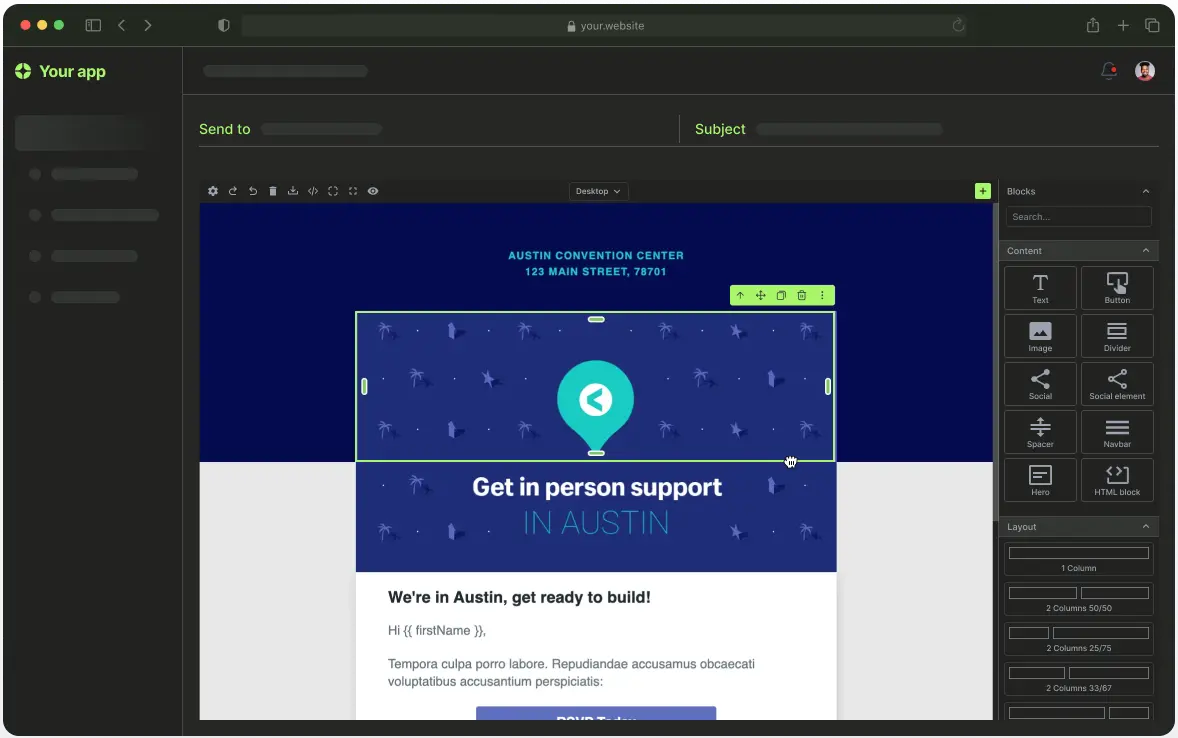
The Future of Email Marketing is Here
Creating beautiful, responsive emails has never been easier. Grapes Studio combines the power of AI-driven design with professional email standards, making it simple to generate stunning email campaigns that actually work across all email clients—from Gmail to Outlook to mobile devices.
Whether you're a marketing team sending weekly newsletters or a developer building transactional emails, Grapes Studio transforms the email creation process. With AI assistance, MJML by default, and direct integrations with leading email service providers, you can now create, export, and deploy professional emails faster than ever.
Why Grapes Studio for Email Creation?
Traditional email design tools often fall short in a few key areas: they lock you into proprietary formats, make responsive design difficult, or require extensive coding knowledge. Grapes Studio solves all of these problems.
Here's what makes Grapes Studio the ideal choice for email creation:
AI-Powered Email Generation
Simply describe what you want, and Grapes Studio's AI will generate a complete email template in seconds. Need a "product announcement email for a new software launch" or a "holiday newsletter with festive colors"? Just type your vision, and watch as AI creates a professional, responsive email layout complete with:
- Structured layouts optimized for email clients
- Professional styling and color schemes
- Responsive components that work on all devices
- Industry-standard email components
No more starting from scratch or hunting for templates. AI handles the heavy lifting, so you can focus on perfecting the message and branding.
Visual Drag-and-Drop Editing
Once AI generates your email, the visual editor lets you fine-tune every detail. Adjust spacing, colors, fonts, and layouts with intuitive point-and-click controls. Swap components, rearrange sections, and preview your changes in real-time—all without writing a single line of code.
MJML: The Foundation of Reliable Emails
One of Grapes Studio's biggest advantages is its use of MJML (Mailjet Markup Language) as the default email format. If you're not familiar with MJML, here's why it's a game-changer:
What is MJML?
MJML is a markup language designed specifically for email. It abstracts away the complexity of email HTML (which is notoriously inconsistent across clients) into a simple, semantic syntax. Instead of wrestling with table-based layouts and inline CSS compatibility, you work with clean, logical components.
Benefits of MJML
1. Cross-Client Compatibility
Email clients are notoriously inconsistent. Outlook uses Word's rendering engine. Gmail strips certain CSS. Apple Mail behaves differently than iOS Mail. MJML handles all of these quirks automatically, generating bulletproof HTML that renders correctly everywhere.
2. Responsive by Default
Mobile email opens account for over 40% of all email interactions. MJML components are mobile-responsive out of the box. Your emails automatically adapt to screen sizes without extra coding or testing.
3. Maintainable and Clean
Traditional email HTML is a mess of nested tables, inline styles, and vendor-specific hacks. MJML code is clean, readable, and easy to maintain. A simple <mj-section> and <mj-column> structure replaces pages of complex table markup.
4. Component-Based Architecture
MJML provides pre-built components for common email elements:
<mj-section>and<mj-column>for layouts<mj-text>for typography<mj-button>for CTAs<mj-image>for images<mj-divider>for separators- And many more
These components are battle-tested across millions of emails, ensuring reliability.
5. Future-Proof
As email clients evolve, MJML adapts. The MJML community continuously updates the framework to support new email client features and fix rendering issues, so your emails stay current without constant maintenance.
How Grapes Studio Uses MJML
In Grapes Studio, when you create an email project, everything runs on MJML under the hood. You design visually, but the output is clean, standards-based MJML that compiles to perfect HTML. This means:
- Your emails work across all major email clients
- The code is maintainable and exportable
- You can leverage the full MJML ecosystem
- Your designs are future-proof
Direct Mailchimp Export
Once you've created your email in Grapes Studio, getting it into your email marketing platform shouldn't require copy-pasting HTML or manual workarounds. That's why we've built direct Mailchimp export right into the editor.
How It Works
With Mailchimp integration, you can:
- Export directly to Mailchimp with a single click
- Preserve all styling and formatting automatically
- Maintain responsive layouts without extra configuration
- Update existing campaigns or create new ones
No more downloading HTML files, importing them manually, or fixing broken layouts in Mailchimp's editor. Your Grapes Studio design becomes a Mailchimp campaign instantly.
Why This Matters
Time is money, especially in marketing. The Mailchimp export eliminates hours of tedious manual work and ensures pixel-perfect consistency between your design and your sent emails. It also reduces the risk of errors—no more accidentally breaking layouts during the import process.
Coming Soon: Constant Contact and Klaviyo Integrations
We know that different teams use different email service providers. Mailchimp is just the beginning.
Constant Contact Integration — Coming soon, you'll be able to export your Grapes Studio emails directly to Constant Contact campaigns, maintaining the same seamless workflow for teams using this platform.
Klaviyo Integration — We're also working on Klaviyo support, enabling direct export to one of the most popular platforms for e-commerce email marketing.
These integrations will work just like the Mailchimp export: design once in Grapes Studio, export to your ESP of choice, and send. No code, no hassle, no compatibility issues. We're working hard to add a number of new integration in the coming months, which you can find here.
The Complete AI Email Workflow
Here's how your email creation process works with Grapes Studio:
- Describe Your Vision — Tell AI what kind of email you want to create
- AI Generates Template — Get a complete, responsive email layout in seconds
- Visual Customization — Fine-tune colors, fonts, images, and copy with drag-and-drop editing
- Preview & Test — See exactly how your email will look across devices
- Export to Your ESP — Send directly to Mailchimp (or soon, Constant Contact or Klaviyo)
- Deploy & Measure — Your email is ready to send with perfect rendering guaranteed
This entire workflow happens in minutes, not hours or days.
Perfect for Every Email Use Case
Grapes Studio excels for any type of email:
Marketing Emails
- Product announcements
- Seasonal campaigns
- Newsletter templates
- Promotional offers
- Event invitations
Transactional Emails
- Order confirmations
- Password resets
- Welcome sequences
- Account notifications
- Receipts and invoices
Automated Campaigns
- Drip sequences
- Abandoned cart emails
- Re-engagement campaigns
- Onboarding series
- Customer lifecycle communications
All with AI assistance, MJML reliability, and direct ESP integrations.
Technical Benefits for Developers
If you're a developer building email functionality, Grapes Studio offers significant advantages:
- MJML JSON Export — Get clean, structured MJML code for programmatic use
- Email Integration — Use Grapes Studio to export directly to your preferred email application
- Template Reusability — Create once, reuse across campaigns
- Version Control Friendly — MJML code works perfectly with Git
Getting Started
Ready to revolutionize your email creation process? Getting started with Grapes Studio is simple:
- Sign up for Grapes Studio and create a new email project
- Use AI to generate your first email template
- Customize the design to match your brand
- Export directly to Mailchimp
- Watch for Constant Contact and Klaviyo integrations coming soon
No credit card required. Start building better emails today.
The Bottom Line
Email marketing is more important than ever, but creating emails that actually work shouldn't be a struggle. Grapes Studio combines:
✅ AI-powered generation for instant templates
✅ MJML foundation for bulletproof rendering
✅ Direct ESP integrations for seamless deployment
✅ Visual editing for complete design control
The result? Faster email creation, better rendering, and more time to focus on what matters—your message and your audience.
Try Grapes Studio for Email Today and experience the future of email design.
🚀 Start Creating Professional AI Emails Now! 🚀